|
To retrieve your password from Lima double click the Lima icon on your desktop. This will display the log in window (shown below).
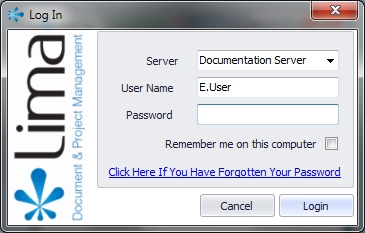
Click the "Forgotten your password?" link and a new dialogue box entitled "Retrieve Account Information" will open.

Enter either your username (as shown in the picture above) or the email address associated with your Lima account and click OK.
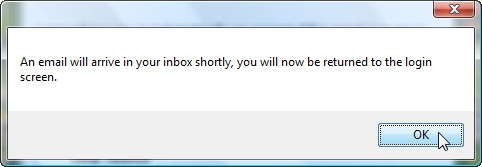
The following dialogue box will be displayed informing you that you will receive an email containing your username and password shortly. Click OK to return to the Lima Log In screen.
Open your email client software (MS Outlook) and open the email sent from support@projectlima.co.uk. If the email has not arrived, choose the refresh or send/receive all folders option in your email client.
The email (shown below) will be sent to the email address you registered with Lima.

Please delete the email containing your password details from within your inbox. Furthermore, users may wish to change their password.
--End--
Related topics:
- How to change your password

|